
If you're running Google Ads for a local business, you've probably felt this before. The budget is real money, hundreds or thousands of dollars every month, and yet the phone isn't ringing the way it should. When it does ring, half the calls aren't even close to what you're looking for.
Someone calls asking if you're hiring. Someone else wants to know if the estimate is really free, and then hangs up when they hear it's not. A student emails asking for "any information" for a school project. Someone asks a detailed technical question, thanks you for your time, and says they're going to try fixing it themselves. None of these people were ever going to become customers, but every one of those clicks came out of your budget.
When this happens month after month, it's easy to conclude that Google Ads just doesn't work for your business. In most cases, that's not actually what's happening. Google isn't broken, it's doing exactly what it was told to do: match your ad to searches that look related to your keywords, whether or not the person searching actually wants what you sell.
The gap between "looks relevant" and "is relevant" is where most wasted ad spend lives. Closing that gap is largely about one specific, unglamorous tool inside your Google Ads account, one that most business owners have never been shown how to use properly.
Why Wasted Clicks Are So Expensive
Local service searches are some of the most competitive, and expensive, keywords on all of Google. Plumbers, roofers, HVAC companies, dentists, and lawyers are all bidding against each other for the same relatively small pool of searches, which pushes the cost of every click upward.
That matters because every dollar spent on a click that was never going to convert is a dollar that isn't available for a real customer. A wasted click doesn't just fail to produce a lead, it actively takes budget away from the clicks that could have.
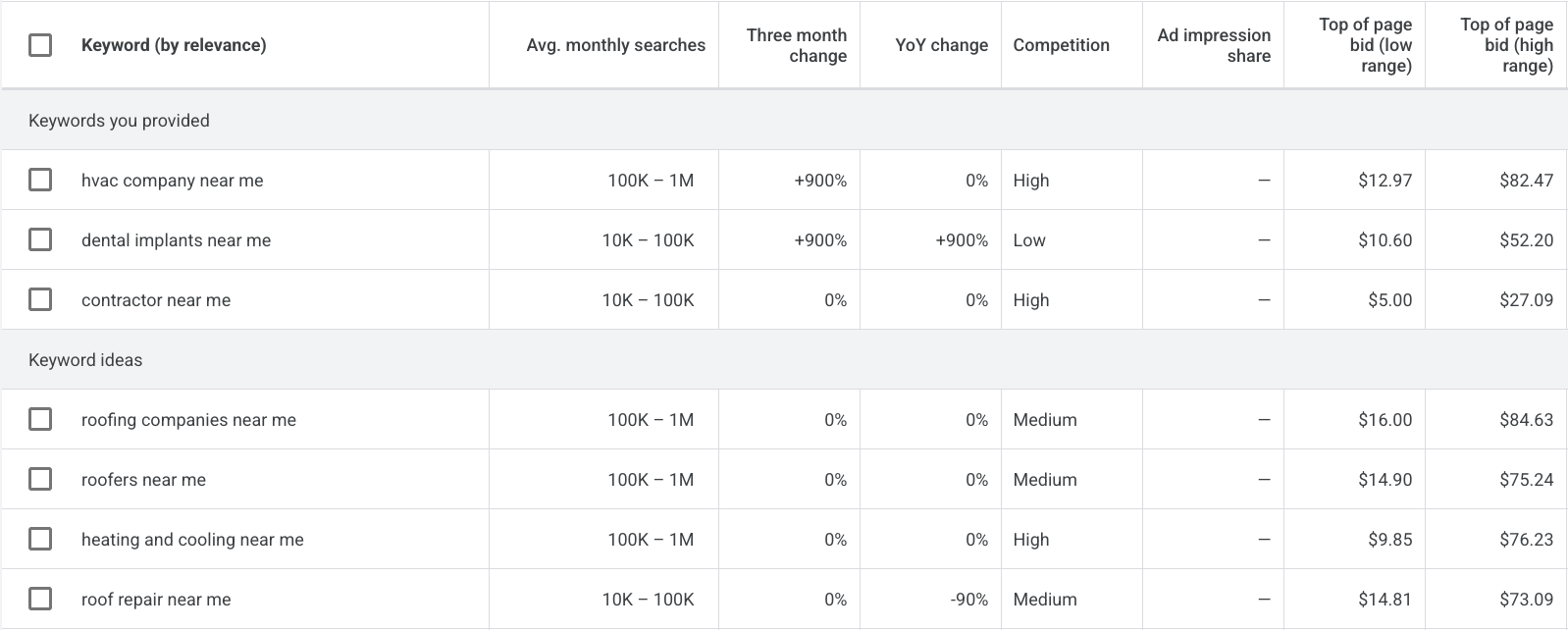
High-intent service keywords are not cheap. According to Google Keyword Planner, top-of-page bid estimates for searches such as "HVAC company near me" and "roofing companies near me" can exceed $80. These are estimated bid ranges rather than guaranteed costs, but they highlight why allowing ads to appear for irrelevant searches can quickly drain a campaign budget.
Fortunately, expensive clicks don't have to become wasted clicks. The strongest Google Ads accounts are built on a few things working together at the same time:
- Better keyword selection from the start
- Long-tail keywords that reflect specific buying intent
- Phrase and exact match types used where they make sense
- Ongoing review of the Search Terms report
- A well-maintained, business-specific negative keyword list
None of these work well in isolation. A great keyword list with no negative keyword strategy still leaks budget. A long negative keyword list bolted onto a poorly structured campaign won't fix a fundamentally weak account. They have to work together.
What Are Negative Keywords?
A negative keyword is simply an instruction that tells Google, "don't show my ad when someone searches for this." It's the opposite of a regular keyword. Regular keywords tell Google when to show your ad. Negative keywords tell Google when not to.
Here's what that looks like in practice.
Say an HVAC company running HVAC marketing campaigns advertises "air conditioning repair." Without negative keywords, that same ad might also show up for searches like "air conditioning repair jobs hiring," "how to repair air conditioning myself," or "air conditioning repair training courses." None of those searchers want to hire an HVAC company, they want a job, a DIY tutorial, or a certification program. Adding "jobs," "hiring," "how to," "myself," and "training" as negative keywords stops the ad from wasting a click on any of them.
A dental practice running dental marketing campaigns for "dental implants" runs into a similar problem. That keyword can also surface searches like "dental implants cost reddit," "dental implant training for dentists," or "dental implant pain how long." The first is someone doing anonymous research who isn't ready to call anyone, the second is another dental professional looking for continuing education, and the third is someone already mid-treatment elsewhere. Adding negatives like "reddit," "training," and refining around "how long" and "pain" as standalone modifiers keeps the ad reserved for people actually looking to book a consultation. We've seen this play out directly, our dental implant case study walks through what happened to cost-per-lead once an account like this actually got cleaned up.
Keyword vs. Search Term: What's the Difference?
These two terms get used interchangeably, but they mean different things, and understanding the difference is the entire foundation of managing negative keywords well.
A keyword is what you, the advertiser, tell Google you want to be found for. A search term is what an actual person typed into Google before your ad was shown to them. Google matches search terms to your keywords using its own matching logic, which is often broader than business owners expect, even keywords set to a more restrictive match type can still trigger on search terms that only loosely relate.
| Keyword | Search Term |
|---|---|
| What you bid on | What someone actually typed into Google |
| Set by the advertiser | Generated by real user behavior |
| Example: "roof repair" | Example: "how to repair a roof myself" |
| Visible in your campaign settings | Visible in the Search Terms report |
The Search Terms report is where the real story of your account lives. It shows you exactly what people typed before clicking your ad, which is the only way to actually see where budget is leaking.
The Most Common Irrelevant Searches
Most wasted spend falls into a handful of predictable categories. Recognizing the pattern is often more useful than any single example.
Jobs
Searches like "HVAC technician jobs" or "plumber hiring near me." These are job seekers, not customers.
Training & Education
Searches like "how to become a roofer" or "dental implant certification course." Students, not patients or clients.
DIY
Searches like "fix AC unit myself" or "how to patch a roof leak." These people already decided not to hire anyone.
Free
Searches including "free" or "no cost." Worth keeping if you genuinely offer free estimates, risky if you don't.
Research
Searches like "what causes ac units to freeze." Top-of-funnel questions, not appointment requests.
Wrong Services
A plumber running broad match might get "plumbing supply store" or "plumbing parts wholesale," product searches, not service calls.
Wrong Locations
A business serving one metro area can still show up for a different city entirely without careful location and negative keyword management.
Existing Customers
Searches like "[your business] phone number." Rarely harmful, but you're often paying for traffic that would've found you anyway.
How to Find Wasted Ad Spend
Finding wasted spend isn't complicated, but it does take consistency. Here's the actual process:
Open the Search Terms report. Inside Google Ads, this lives under Insights and Reports, or directly within a campaign's keyword view.
Review the search terms, not just the keywords. Look at what people actually typed, not what you originally bid on.
Group the patterns. Look for recurring themes: job-related terms, DIY phrasing, wrong locations, wrong services.
Add negatives at the right level. Some belong at the ad group level, others should apply account-wide.
Keep reviewing. New irrelevant patterns show up as seasons change and campaigns grow. This isn't a one-time fix.
Don't Just Download Someone Else's Negative Keyword List
A quick search will turn up plenty of generic "negative keyword lists for [industry]" that agencies hand out or sell. These lists are tempting because they feel like a shortcut, but they can do real damage if applied blindly.
The problem is that words like "cheap," "cost," "reviews," and "financing" are not universally bad. Whether they should be blocked depends entirely on your specific business and how it's positioned.
A budget-focused HVAC company might want to keep "cheap" and "affordable" as active keywords rather than blocking them, because that's exactly the customer they're trying to reach. A premium dental practice might want to exclude "cheap" entirely because it attracts the wrong kind of lead. "Financing" could be a valuable keyword for a practice that offers payment plans, or a wasted click for one that doesn't. There's no universal answer, which is exactly why a generic list applied without context so often does more harm than good.
This is where working with someone who actually manages your account, rather than handing you a template, makes a real difference. Negative keyword strategy should be built around your specific offer, your specific market, and what a genuinely qualified lead looks like for your business specifically.
Negative Keywords Are Only Part of the Solution
Cleaning up search terms is one of the highest-leverage things you can do in a Google Ads account, but it isn't the whole picture. If results are still weak after tightening up negative keywords, the issue is often sitting somewhere else in the funnel:
- Landing pages that don't clearly match the ad or make it hard to take the next step
- Conversion tracking that isn't set up correctly, making it impossible to know what's actually working
- Offers that don't give someone a compelling reason to choose you over the next result
- Campaign structure that lumps unrelated services or locations together
- Bidding strategy that isn't aligned with how the business actually wants to spend
- Ad copy that doesn't speak directly to the person searching
- Response time, since even a perfectly qualified lead can be lost if nobody follows up quickly
A truly healthy account treats negative keywords as one piece of a larger system, not a silver bullet on its own. That's the difference between a one-time cleanup and ongoing Google Ads management, the second one catches these issues before they quietly drain a month's budget.
A Practical Google Ads Audit Checklist
If you want to do a first pass on your own account, work through this list:
The Bottom Line
Negative keywords aren't about blocking traffic. They're about blocking the wrong traffic, so the budget that's left is spent entirely on people who could actually become customers. Done well, it's one of the simplest, least expensive changes available in an existing account, and one of the most consistently underused.